
AudioRouter Performance Round Two: Canvas GPU, a Native Leak, and Fewer Background Walks
Posted on:
The memory diet article ended with one open item: while audio played, the AudioRouter window used about one core, mostly drawing the animated connections on the canvas. I wrote that it deserved its own measurement before anyone touched it. This article is that measurement, plus what came out of the long runs I did afterward.
Everything here shipped in 0.0.17, over five days. There are four changes:
- The canvas GPU cost while playing.
- A native memory leak in the Rust shell that had been there since the first release.
- The background call that was triggering that leak every 4 seconds.
- The backend logger decoding responses it was about to throw away.
A soak harness first
The memory diet work was measured over minutes. An app that sits in the tray all day needs to be measured over hours. So before chasing anything, the agent wrote run-app-soak.ps1. It runs the release shell for a number of hours on a copy of my database, with its own LOCALAPPDATA and its own WebView2 profile, so my real AudioRouter and its settings are never touched. Every 30 seconds it samples memory, handles, threads and log size, and at the end it grades the growth of each.
.\tools\quality\run-app-soak.ps1 -Hours 8 -AutoPlay
I ran it overnight on a complex real session: 19 nodes, a microphone voice chain, a game chain, a Discord capture, two mixers, a duck and a recorder. The dry run already caught a bug before any measurement: at startup, the window and the backend disagreed on which session was active, and they kept overwriting each other. 24 writes in 0.4 seconds, flipping between two sessions. That one was a plain logic fix, found only because the harness starts the app from a clean profile.
The canvas: 135% of a core of GPU
The first overnight attempt showed the WebView going from about 6% of a core to bursts of 130% to 170% while the shell stayed at 6%. The heap, the DOM and the listeners were flat, so it was not memory. It was drawing.
The first two attempts to find the cause on the live route gave contradictory answers. The cost followed the audio: when I talked, more connections lit up, and the numbers moved. Measuring a moving target twice gives two different numbers, and both look convincing.
So the agent moved the measurement to a controlled setup: headed Edge on the existing route test harness (4 paths, 12 nodes, 8 live connections) with fixed simulated telemetry, CPU per process read from the Chrome DevTools Protocol (SystemInfo.getProcessInfo), and each visual layer switched off with injected CSS. Three rounds, rotating the order of the conditions.
Baseline: 135% of a core in the GPU process and 78% in the renderer. With the canvas hidden: 1%.
The cause was a detail of how React Flow draws: every connection lives in one SVG the size of the canvas. Any change on any connection repaints the whole layer. Three things kept changing it:
- The comets (the small lights travelling along a live connection) were SMIL
animateMotionelements inside that SVG. Six per connection, and the hidden ones were still animating at opacity 0. That kept the layer repainting at 60 fps. About 40 points of GPU. - The connection level changed the color and width of the line on every 20 Hz telemetry tick, with a 160 ms CSS transition. Each tick restarted the transition before the previous one ended, so the layer never stopped repainting. About 50 points.
- The meters on the nodes animated
height, which triggers layout.
The fixes:
- The comets moved out of the SVG. They are now small HTML elements in React Flow's label layer, moved with Web Animations
transformkeyframes. The compositor moves them without repainting anything. The keyframes are computed along the curve at constant speed, so they look the same as before. - Connections draw the level in 3 dB steps, without transitions. Rounding means most ticks change nothing, and nothing is repainted.
- Meter bars scale with
transforminstead ofheight.
export const LEVEL_STEP_DB = 3;

/** The level a connection draws: `levelDb` rounded to `LEVEL_STEP_DB`. */
export function shownLevel(levelDb: number | null): number | null {
  return levelDb === null || !Number.isFinite(levelDb)
    ? levelDb
    : Math.round(levelDb / LEVEL_STEP_DB) * LEVEL_STEP_DB;
}
Result on the same harness: 46% GPU and 43% renderer with the lights moving. Most of what remains is the cost of compositing a window at 60 fps.
There was also a product decision. The setting "Animated connections" had three values: always, while AudioRouter is the active window, or never. The default was "always". Most of the time the window sits behind a game, where nobody sees the comets. The default is now "while AudioRouter is the active window", which brings it to 17% GPU and 24% renderer when another program is in front. People who had already picked a value keep it.
| Condition (8 live connections) | GPU process | Renderer |
|---|---|---|
| Before | 135% | 78% |
| After, lights moving | 46% | 43% |
| After, lights paused (new default when not focused) | 17% | 24% |
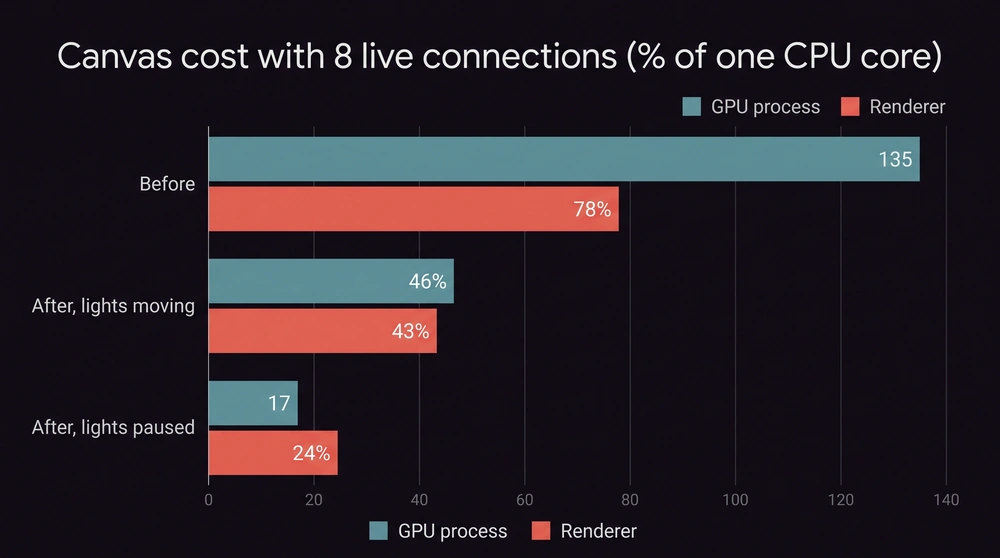
The rule that went into the project's AGENTS.md: never animate inside the shared edge SVG, and measure canvas cost with controlled telemetry, per process, not on a live route.
The shell: 9.3 MiB per hour, for 8 hours
With the canvas fixed, I ran two more overnight soaks. Both flagged the same thing: the shell's private bytes grew 9.3 MiB per hour, in a straight line, for 8 hours. About 220 MiB a day for an app meant to stay on all the time. The working set stayed flat around 45 MiB while private bytes grew, which means memory written once and never read again.
This time it was not garbage collection. The shell is Rust. The agent narrowed it down with a few probes, each one on a database copy beside my real app:
- Idle, nothing playing: flat. So something tied to normal activity.
- The window's request path flooded: 777,000
system.diagnosticscalls through DevTools, about 10 hours of the 20 Hz refresh. +1.4 MiB, then flat. The window, Tauri, the pipe and the backend request path do not leak. - A dhat build (Rust heap profiler as the global allocator): the live Rust heap stayed around 6 KB and flat, while process private bytes still grew 8 MiB/h. So the leak was not a Rust allocation. It was native.
For native memory, the agent used the Windows debugger (cdb) to take two snapshots of the process heap 25 minutes apart and compared the block counts per size. Every size was stable except one: the 128-byte bucket went from 15,112 to 43,039 blocks. Dumping a few of those blocks showed strings like {0.0.1.00000000}.{…}. Those are Windows audio endpoint IDs.
The cause was six lines of code. IMMDevice::GetId returns a string allocated by COM. In the windows crate, that is a raw pointer with no destructor: the caller must free it with CoTaskMemFree. All six call sites copied it with to_string() and dropped the pointer. Two of them even had a comment saying the crate wrapper frees it. It does not. Each walk of the audio endpoints leaked about 150 bytes per endpoint, and my PC has 62 endpoints.
The fix is one helper used at all six sites:
unsafe fn take_endpoint_id(id: windows::core::PWSTR) -> Result<String, AudioError> {
    // SAFETY: `id` is a live, NUL-terminated CoTaskMem string owned here.
    // It is read once, then freed exactly once.
    unsafe {
        let text = id.to_string().map_err(|_| AudioError::InvalidUtf16);
        windows::Win32::System::Com::CoTaskMemFree(Some(id.0 as *const core::ffi::c_void));
        text
    }
}
A regression test walks all endpoints 500 times and checks how much the process heap grew. On the old code it failed with 5.6 MB left behind. With the fix it passes. Then the real check, another overnight soak on the fixed build:
| Check over 8 hours | Before | After |
|---|---|---|
| Shell private bytes slope | 9.31 MiB/h | 0.11 MiB/h |
| Shell private bytes at the end | 104.8 MiB | 30.9 MiB |
| Handles | 509 | 509 |
| Errors in logs | 0 | 0 |
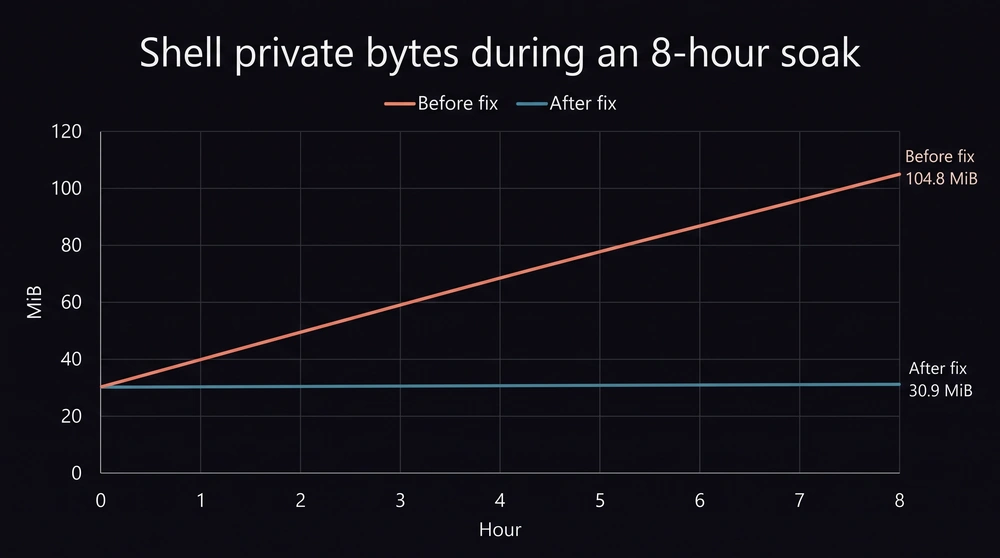
This bug had been in every release since the first Windows audio adapter, v0.0.1. The short tests never showed it because 9 MiB per hour is invisible in a 10-minute run. It took an 8-hour run to see a slope.
Who was walking the endpoints every 4 seconds?
The leak fix stopped the bleeding, but one question was still open: why was something enumerating every audio endpoint so often while playing? The leak rate matched one walk every few seconds.
The first suspect was the endpoint monitor: it re-enumerates when Windows reports a device change. A probe registered beside the app counted the Windows endpoint notifications: zero in 4 minutes of playing. Not the monitor.
So the agent built a temporary instrumented shell that counted each walk. The answer was virtualCable.status. The UI polls it every 2 seconds to show whether the virtual cable driver is installed and healthy. The backend cached the answer for 2 seconds. Poll, cache, expire, poll: a full walk of all 62 endpoints about every 4 seconds, just to say "the cables are fine".
The cache now lasts until Windows reports an endpoint change, through a read-only notification subscription, with a 30 second backstop for driver states that do not announce themselves. Measured with the same instrumented build: 7.5 walks per 30 seconds down to 1.
The logger decoding what it throws away
The dhat profile from the leak hunt had a side finding: about 82,000 short-lived allocations per second while playing. All freed, so not a leak, but a lot of work for an app moving audio around.
Part of it was the backend logger. Successful routine reads like the 20 Hz system.diagnostics are not logged; only failures are. But the logger thread built a full JSON tree of every response first, then checked whether to log it, then dropped it.
Now it reads only the error member of each response with serde's IgnoredAny, which skips the rest without building anything, and returns early when every request is a routine read and none failed:
fn any_response_error(responses: &[Vec<u8>]) -> bool {
    #[derive(serde::Deserialize)]
    struct Outcome {
        #[serde(default)]
        error: Option<serde::de::IgnoredAny>,
    }
    responses.iter().any(|frame| {
        audiorouter_protocol::decode_frame::<Outcome>(frame)
            .map_or(true, |outcome| outcome.error.is_some())
    })
}
For a diagnostics response the size of my session (9.7 KB), the logger went from 61 µs to 6 µs per record. A frame that cannot be decoded counts as an error, so it takes the full path and failures are still logged the same way.
A related fix from earlier in the week: the list of reads that should not be logged was a list of method names, and it only had two. The window's newer polls (meters, session summary, recorders, cable status) were logged on every call, and my log files held 33 minutes of history before rotating. The rule is now by method class: every read-only method in the API table logs only failures. The soak harness now reports more than 30,000 hours of history at the measured rate.
What about the driver?
The virtual cable driver had a busy week too, but its work was correctness and qualification, not speed: bit-exact audio at 44.1, 48 and 96 kHz on 1, 2 and 8 channels, THD+N at −153 dB, and cable routes that now open at the cables' actual rate instead of always 48 kHz (before, a cable set to 44.1 kHz moved no audio at all). Those are real results, but calling them performance improvements would be stretching it. They belong in a driver article.
What I take from it
The two biggest problems this week were invisible in the way I tested before. The GPU cost depended on the audio, so it changed every time I measured it on the live route. The leak was 9 MiB per hour, so it hid in any test shorter than a few hours. Both needed a different measurement setup before any code change: a controlled harness for the canvas, an 8-hour soak for the shell.
The leak is also a good reminder about comments. Two comments in the code said the crate freed the string, and nobody questioned them for six weeks. The heap snapshot did not care what the comment said.
The pattern from the memory diet held: measure, change one thing, measure again on the real session in the release build. The agent did the probing, the heap snapshots and the regression tests. My part was running the overnight soaks on my PC, deciding the new default for the animated connections, and asking "who calls this every 4 seconds?" instead of stopping once the leak was fixed.
Pros:
- Each fix has a number before and after, and a regression test that fails on the old code.
- The soak harness is reusable, so the next slow leak should show up in one night instead of in a user's Task Manager.
Cons:
- 8-hour soaks are slow. A fix takes a day to confirm.
- The canvas still costs about half a core of GPU when the window is in front with lights moving. That is the price of a 60 fps window, and I accepted it :)
Discussion
Replies are loaded from the public Mastodon thread for this article.
Loading replies from Mastodon...